
37% of consumers start their search with AI. That’s a percentage you can’t ignore unless you’re okay with losing a huge part of your revenue to competitors actively optimizing for AI answers.
But before proceeding with optimization, it’s critical to understand how to track AI search queries. This way, you’ll be able to map out the right direction for optimization and target relevant prompts for your audience.
Google Search Console for AI Search Tracking
The current version of Google Search Console provides aggregated data about impressions, clicks, and position data in one place.
But last year, Glenn Gabe discussed the idea of an AI search console, or ASC, if you will. This would be a dedicated engine to track just the AI visibility factors. It will tell us what GSC already does, but also integrate advanced analytics to answer questions like:
- Which URLs on your website are indexed for AI search?
- What type of prompts or follow-up prompts is your website ranking for?
- How many times has your website been quoted, referenced, or cited in the AI answers?
While ASC is merely a manifestation at the moment, GSC remains a reality. And we can use it to extract AI search analytics.
The real question remains: How?
How to Find AI Queries in Google Search Console
We’ve already established that it’s important to track your AI visibility to create a sound optimization strategy. But GSC doesn’t have a direct feature that separates your AI queries from traditional ones.
No need to fret, though, because there’s a way around that.
But first, What Makes AI Prompts Different?
There are a number of characteristics of AI prompts that distinguish them from traditional search terms. For example:
- They’re generally longer (mostly over 10 words).
- Most start with a question.
- They are conversational queries carrying a higher probability of follow-up searches.
So, how to analyze search queries in GSC using the roundabout route? Here are a few techniques.
Filter By Question Type
According to multiple sources, 8% of search queries are questions. A big chunk of the searchers asking these questions use AI search tools, as LLMs offer a more dynamic experience and customize answers based on your historical interactions.
Narrowing down your queries by question type is a great way to tap into possible questions your audience is asking on AI search engines. Here’s what you have to do.
- Go to the Performance Report in the Google Search Console dashboard.
- Click on the “Add Filter” option in the top left corner, and select “Query.”
- From the drop-down menu, select Custom (regex), and make sure the tab on the left says “matches regex.”

- Filter for queries containing words that begin with question terms like how, what, why, who, can, is, or does. For this, use the following regex code.

- Click “Apply” to generate a list of question-based search terms.
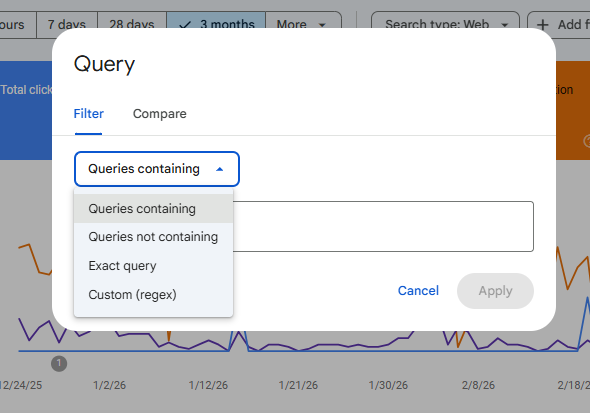
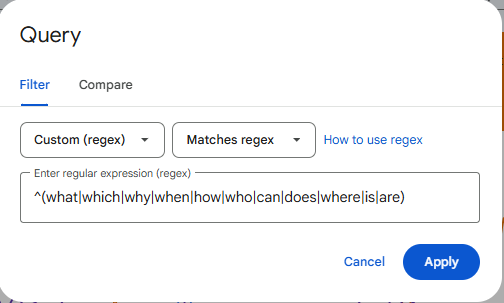
With this step, you’re essentially isolating questions your potential audience is already asking. Download a CSV of this and use it as a blueprint when targeting search prompts for AI search results.
Filter by Word Count
AI prompts aren’t like your standard search queries that almost never go over 10 words.
So, if you think about it, filtering queries containing more than ten words is data redirecting from alternative search sources, aka, AIOs, AI Mode, or generative AI engines.
Here’s a step-by-step breakdown on how to track AI search prompts using word count as a reference.
- In the GSC Performance Report, find the “Add Filter” option.
- Select “Query,” and pick Custom (regex) from the drop-down menu.
- Plug in this regex code:
^(?:\S+\s+){9,}\S+$
- Click Apply to see search queries that contain more than ten words.
This process helps identify long-tail queries in GSC, which often overlaps with the conversational style in AI prompts. Once extracted, you can use the data for AI prompt engineering, creating content ideas, or generating topic clusters.
Filter By Transactional Terms
AI isn’t just a search engine divulging information to people searching for answers; it’s also a decision driver. Yes, it can influence consumer preferences and purchase decisions.
A report by the University of Virginia highlights that nearly 60% of consumers use AI to help them shop.
So, your potential customers are probably using generative AI tools to search for products you sell. And knowing what type of prompts they use could help tap into more traffic and revenue opportunities.
To filter out just the transactional queries in Google Search Console, use the same method we did above when filtering for questions. But instead of sorting by how, when, where, you’ll filter for terms like buy, purchase, price, cost, quote, and order. Use this regex code.
^(buy|purchase|order|price|cost|quote|order)
Can You Really See AI Mode & AI Overview Data In GSC?
The performance report in Google Search Console combines all clicks from organic listings, AI Overviews, and AI Mode. The Google documentation confirmed in the latest update that you can review three search factors in the GSC performance report.
- Your impressions
- Your clicks
- And ranking positions
And this data isn’t relevant to traditional blue links only; it also merges Google’s AI search features. So, the clicks and impressions you see on your dashboard include any clicks or impressions from AI Mode and AI Overviews as well.
While AI Mode follows the same methodology for positions as traditional search, AIO positions are all considered the same, and there are no rankings allocated. The document mentions:
“An AI Overview occupies a single position in search results, and all links in the AI Overview are assigned that same position.”
What’s Next?
When you’re tracking AI search queries, you’re basically accessing a treasure trove of ideas. These aren’t just search terms you’re appearing for; they represent opportunities that can generate significant traffic and revenue.
Download a CSV from all versions of the filtered queries above. That’s your final dataset collected from GSC. Combine all queries in one sheet, and use this as your standard guide to plan topic clusters, target prompts, and drive AI visibility campaigns.
Ready to track, tap, and rank?