Social Media Tracking Guide for SEO, PR, and Marketing
On this page
Skip the reading — get a live diagnosis.
Book a callIf you’re only watching your performance on the search engine results page, you’re seeing just a fraction of the picture. For a 360-degree view of brand performance, visibility must be tracked across every digital platform, including social media. In this blog, we’ll show you how to leverage social media tracking to double down on strategies that actually work to improve performance and visibility.
Want to ensure that your tracking is well-rounded? Let’s begin!
Where to Begin—Popular Platforms You Should Be Tracking
The truth is, brands don’t live on just one platform, and neither should their tracking. The easy answer to which social media platforms you should be tracking is this: all platforms that your brand is active on.
But a few platforms tend to get overlooked despite driving real ROI. Here’s where to start.
Instagram & Facebook:
Your official revenue channel might be your website, but Instagram and Facebook could be the platforms where people actually notice your brand. While Instagram or Facebook don’t have a traditional ranking system, the traffic and impressions they drive to your website should be accounted for, and most brands post to social far more often than they update their website.
Google mentions that “….when searching for current news topics, content freshness plays a bigger role than dictionary definitions.” And in most cases, brands have better posting frequency on social media than on their website, so it checks one reason to tap into and track the mainstream social channels like Facebook and Instagram.
The OG professional dashboard for businesses, entrepreneurs, and thought leaders, LinkedIn isn’t just a platform to share your personal achievements, job news, and showcase professional activities; it’s where B2B thrives, and communities are bred. Therefore, tracking how your account is performing on this social channel could be highly lucrative.
YouTube
YouTube is a video-centric platform that presents a good opportunity for businesses to get ranked in the Video tab on Google and Bing search.
It’s also where brands find a voice. While your website draws in traffic via traditional search, YouTube helps build a loyal following that’s actually interested in listening to your brand’s perspective on the topics in your niche.
TikTok
Social media is highly influenced by trends, and TikTok is one of the most trend-driven social media platforms online. That’s exactly why retail and DTC brands lean into it:
Plus, the app’s interface and functionality seamlessly align with current user behavior: short-form and easy-to-consume content with a strong conversion potential.
Native TikTok Analytics include views, watch time, engagement rate, follower growth, and CTR.
Conversion rate is also trackable, but typically requires a TikTok Pixel or TikTok Shop integration rather than appearing in the default dashboard.
Best Tools to Track Social Media Performance
Each social media platform offers built-in tracking tools to help creators examine how their content is performing. After initial account creation, set up analytics for each platform to ensure seamless tracking.
Meta Business Suite:
Meta Business Suite provides complete analytics for your combined Instagram and Facebook accounts. Note that if you already have a business page, your Meta Business Suite will be created by default, so all you have to do is log in to your account to access it. Once there, find the ‘Insights’ tab on the top left to track important metrics like:
- Best-performing content (including posts with the highest engagement rate and topics with the highest visibility)
- Content Interactions or Engagement Rate (total likes, comments, reshares, etc.)
- Follower count (accounts that followed or unfollowed you, and when)
- Audience demographics (interests, location, age, gender, etc.)
- Link clicks (redirects to the web pages shared in posts or your bio)
Studying these metrics helps business owners better create audience personas and target customers with the strongest intent for conversions. They can also pick a reporting timeline to compare progress across specific quarters, ad campaigns, and strategic marketing transitions.
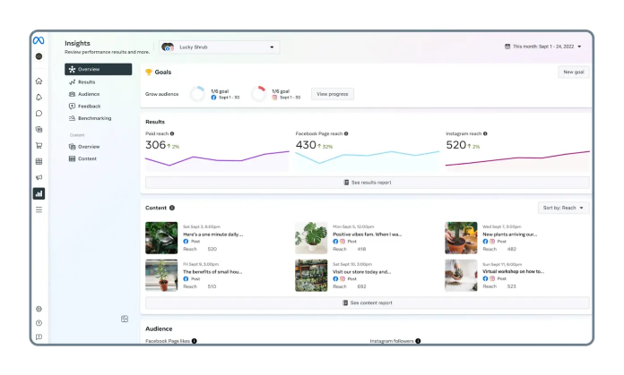
Image Source: Sprinklr
What’s more, Meta Business Suite allows cross-channel campaign management with its unified analytics dashboard and proprietary features like a combined inbox, ads center, and scheduling/assigning options.
If your Instagram and Facebook accounts are not connected, you will find insights in the Professional Dashboard section of your individual profiles.
LinkedIn Analytics:
LinkedIn has a dedicated analytics dashboard designed to help users drive strategic growth as they work to establish industry leadership or build professional connections.
While at its core, it may seem like LinkedIn is all about sharing professional and personal journeys, organic growth on LinkedIn can drive measurable website traffic and conversions. But it’s possible only with the right social media optimization tactics, which are largely tied to proper tracking and analysis.
Knowing how to not just analyze but also leverage that information to improve reach, impressions, and engagement could turn out to be fundamental for B2B and B2C brands. Here’s how to get started.
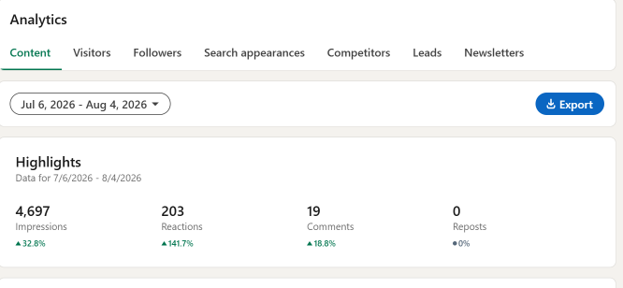
- Log in to your LinkedIn business profile.
- Find “Analytics” on the left-hand panel of the screen.
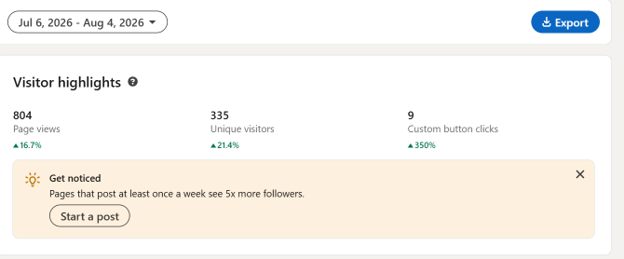
- You’ll come across a screen similar to the one below. Navigate through the tabs on the horizontal bar at the top to access data relevant to content, visitors, search appearances, competitors, leads, and followers. Each of these tabs covers a different layer of performance

- In the visitors tab, you’ll be able to view total page views and unique visitors, as well as the number of clicks on the button links you shared. This section also highlights which device types were used to view content shared on your business profile.

TikTok Business Suite:
You don’t need a business account on TikTok to view performance data. The platform offers TikTok Studio for non-business accounts and Business Suite for business accounts, enabling all users to assess how their content is performing.
- To view this data, log in to your TikTok account and open TikTok Studio or Business Suite.
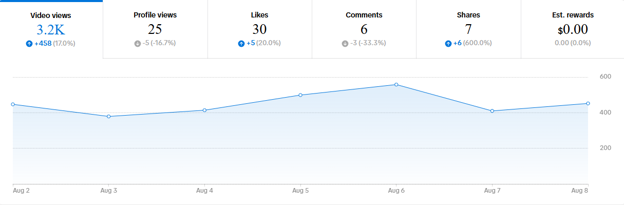
- Click on Analytics to examine key metrics, including total views, profile views, likes, comments, and shares.

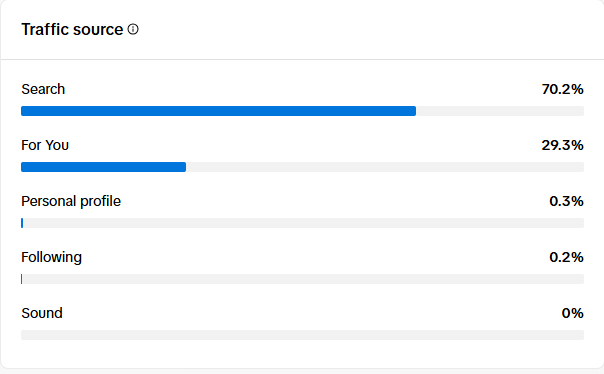
- The dashboard also breaks down traffic sources and search queries used to find your profile or posts.

- View which videos are performing well, which hours of the day your followers are most active, and what types of audience are interested in your content.
YouTube Studio
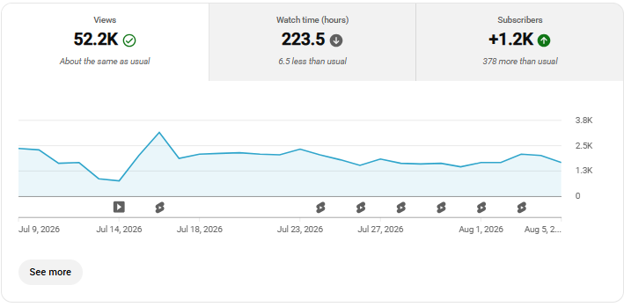
For many businesses, YouTube is a primary revenue channel, making YouTube-specific analysis and reporting a regular part of operations. But even if that isn’t the case, YouTube could be used alongside a website to boost visibility and CTR. The key is knowing how to analyze and interpret the data accurately to turn insights into strategic campaigns that drive measurable results.
There’s a lot more to YouTube analytics than just views and subscriber count. You can view and track trending topics, external traffic sources, and growth patterns. Essentially the data that can prove to be monumental in boosting visibility across search engines. So, it’s worth investing time in YouTube analytics if you’re serious about growth on this platform. Google’s own YouTube Analytics guide is a good starting point.
Google Search Console: Platform Properties
In July 2026, Google launched its own social media monitoring capabilities in GSC, and it’s a revolutionary step in social media tracking. The new features let users see how their social and video content performs in Google Search and Discover, without needing a verified website.
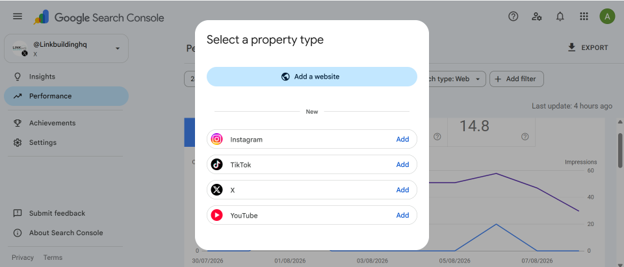
At the moment, it’s only compatible with four platforms, including Instagram, X , TikTok, and YouTube.
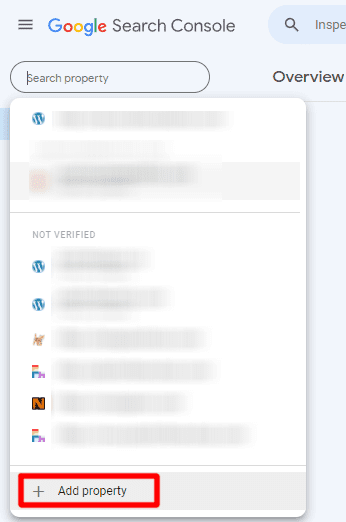
Here’s how you can integrate social media analytics into your GSC dashboard.
- Find “Add property” in the left drop-down menu on the dashboard.

- In the window that opens next, pick the social media channel you want to track. Add your credentials and complete the verification process.

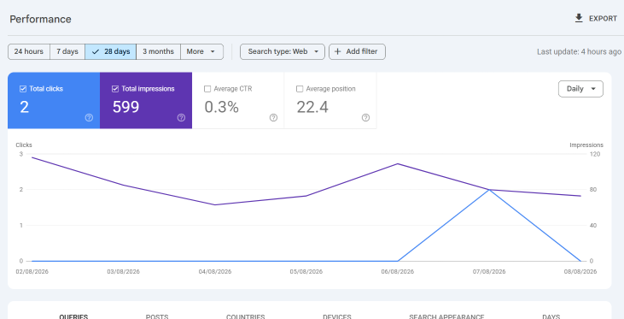
- Once verified, you’ll be able to track platform performance, including total impressions, clicks, keywords, device data, and more.

Each account needs its own separate property, so if you manage multiple Instagram or TikTok profiles, you’ll set each one up individually.
Step-by-Step Process To Set Up Social Media Tracking
A tracking tool is only as effective as the strategy behind it. Numbers alone won’t tell you much, but a clear plan is what sets the tone for improved performance. This step-by-step guide can help put that plan into motion.
1. Pick Your Channels
Based on your business model, pick the social media channels that can be a good secondary traffic source for your website. This usually depends on niche and audience personas. For example, if you want to target B2B, LinkedIn is probably the best choice, whereas a clothing brand will find better promotional opportunities on Instagram and TikTok.
So, before you begin tracking your socials, make sure you’re on the right track first.
2. Define your KPIs:
Starting with clear KPIs reinforces strategic accuracy. Social media metrics help gauge whether your content actually resonates with your audience. Set KPIs based on measurable metrics that indicate real growth:
Engagement—The number of likes, comments, and shares on your posts. A central assessment metric for this is the percentage of engaged audience against total reach.
Reach—How many users see your content, including unique visitors, feed impressions, and repeat views.
Conversions—The number of successful conversion sessions recorded via social media. For example, total website clicks, sign-ups, or orders.
Content—Most popular content topics and types (images, videos, text) that may indicate the scope of growth in the future.
Target Audience—The audience showing interest in your content (age, gender, location, and interests)
3. Apply UTM Tags:
Adding UTM tags to social media URLs enables Google Analytics to log traffic sources accurately. Without them, your analytics just show “traffic,” but with them, it shows “traffic from Instagram story vs. traffic from Facebook post,” so you actually know what’s working.
For unified social media tracking across all channels, follow a standardized UTM protocol. For example,
| UTM Tag | Value (Examples) |
| utm_source | facebook, linkedin, instagram |
| utm_medium | social, cpc, paid-social |
| utm_campaign | winter_sale, brand_awareness |
| utm_content | video_carousel, bio_link, story_sticker |
| utm_term | Specify target keywords for paid ads |
Following this pattern across all channels ensures tracking is transparent and all sources are accounted for. The key is staying consistent: always use lowercase, no spaces, and the same spelling every time (so it’s always “facebook,” never sometimes “Facebook” or “FB”). If everyone on the team follows the same format and tags links before posting them, all your data lines up neatly in one place instead of getting split into messy, duplicate categories.
4. Set up Third-Party Monitoring Tools
Many social media managers prefer third-party monitoring tools to track keywords, conversions, and trends on social media. While proprietary analytics tools offer the highest accuracy, third-party tools deliver advanced features and capabilities like brand sentiment review, competitive analysis, reporting, scheduling, and more.
The Best Social Media Tracking Tools Of 2026
When investing in social media tracking tools, two factors matter most: ease of use and data accuracy. With that in mind, we put together an exclusive list of the top-rated social media monitoring tools, each suited to a different budget and use case.
Note: pricing for enterprise tools changes often and isn’t always published; confirm current rates directly with each vendor before budgeting.
If you’re serious about social media growth, here’s a closer look at how these tools can help with monitoring and management.
1. BrandMentions
Subscription: Starting at $99/month
Best for: Real-time brand monitoring and competitor tracking
A social listening tool that scans the web and social platforms in real time to notify you the moment your brand or keywords get mentioned somewhere. Its sentiment analysis shows how people actually feel about your brand, not just how often it’s mentioned. The tool integrates with numerous social apps, including Facebook, Instagram, X, YouTube, LinkedIn, Bluesky, and Yelp.
Plus, it’s highly valuable for teams looking for fast alerts and competitive tracking. However, there are a few things to look out for if you pick this tool; it has no solid mobile app and may offer limited history in cheaper plans.
2. TalkWalker
Subscription: Custom, quote-based pricing. Talkwalker doesn’t publish rates, but third-party estimates put single-user plans starting around $9,000+/year, scaling with team size and features.
Best for: Enterprise-level social listening and trend analysis
TalkWalker is an enterprise-grade monitoring platform built around AI-driven features, most of which are now part of a paid plan and may no longer be available for free. But the truth is, despite this, many marketers still prefer this tool for its accuracy in:
- Tracking brand mentions across multiple social media channels.
- Forecasting top trends
- Gaining AI-powered insights to analyze popular topics, plan content, and schedule posts.
To put it in a nutshell, TalkWalker is great for larger teams that need deep data and predictive insights. But since it’s fully subscription-based (no free tools available), smaller teams will likely find better value elsewhere.
3. Buzzsumo
Subscription: Starting at $199 /mo
Best for: Content performance, trend tracking, and influencer discovery
BuzzSumo is less about pure monitoring and more about content intelligence. It shows what’s trending, who’s talking about it, and which influencers or journalists are covering your space, making it perfect for content marketers and PR teams doing outreach or following a trend-based strategy. With BuzzSumo, you can:
- Set alerts for keywords, competitors, or products to catch conversations across social media, news, blogs, and even backlinks.
- Discover high-performing articles, trending topics, and top keywords in your industry.
- Find out who’s covering your topic and track who’s sharing your content, from influencers to journalists.
- Compare share of voice, top-performing content, and backlinks against competitors in one shareable dashboard.
At almost 200 bucks, it could be quite pricey. Safer to say it’s suited for bigger budgets and established content-driven brands.
4. YouScan
Subscription: Starting at $499/mon
Best for: Visual social listening and audience sentiment
What makes YouScan stand out among other brand mention crawlers is its ability to spot logos, products, and scenes inside images. So it won’t just tell you about text mentions but also apply visual recognition systems to identify mentions in visual elements.
Plus, it integrates aspect-based sentiment to provide deeper insights into consumer perceptions of your products and services. This means you don’t just get the numbers, but are also able to analyze what people think about your brand and why. Activate the smart alert system to get real-time alerts as your brand perceptions shift, giving you room to respond before a small issue grows.
YouScan can be integrated with social media and management software, including Google Sheets, Facebook, Instagram, Gmail, MailChimp, Slack, Trello, OpenAI, Salesforce, and more.
5. Sprout Social
Subscription: Starting at $199/month
Best for: Social media management, analytics, and reporting
Sprout Social is a full social media management suite that pairs scheduling and engagement tools with solid analytics, so you don’t just track but can also manage on one platform.
The tool offers complete coverage of follower growth, audience demographics, content performance, and brand mentions. What’s more, it lets you create customizable dashboards to allow real-time performance analysis across numerous platforms.
Two of their most prominent features include advanced sentiment analysis for tracking audience trends and views and campaign reporting to assess campaigns and shape marketing strategies.
Integrations available across Facebook, Instagram, TikTok, Twitter, LinkedIn, Pinterest, Google Analytics, YouTube, Shopify, and Salesforce.
Takeaway:
Social media tracking has never mattered more. Brand mentions now sit at the center of your credibility and visibility, so it’s best we treat them accordingly.
As search evolves and user behavior shifts, brands are scrambling to strengthen their social presence. And for good reason. That one platform where your profile isn’t set up might feel harmless, but it could be costing you impressions, clicks, and AI search visibility. To avoid that, make sure your social profiles are active, tracking is in place, and campaigns are built on historical analysis.
You Know How It Works. Let Us Run It.
Book a call with a strategist or check out our services to find the best fit for you.

Written by LBHQ Editorial Team
Strategists and outreach leads who've shipped 4,000+ links and recovered dozens of penalized domains.