
Google Search Console Now Tracks Socials & Video Content
On this page
See how we support link building across different industries.
Explore Our IndustriesGood news for social creators who don’t have a website and work primarily on social platforms like Instagram, TikTok, and YouTube.You no longer have to check Google search visibility for each platform individually. A long-overdue development, but a welcome one nonetheless; Google Search Console now tracks socials and honestly, it’s about time because it’s a useful reporting expansion.
What Google Announced?
Earlier this month, Google introduced a new property type inside Search Console called platform properties, built specifically for creators and brands that have social and video platform presence but did not have a website to verify by. If Google Search Console now tracks socials the way it tracks your domain, it impacts how link builders, SEOs, and social teams use and report performance analytics.
What are Google Search Console Platform Properties?
A platform property is a new type of property you can add inside Search Console and sits alongside domain and URL-prefix properties. Instead of verifying ownership of a website, you authorize Google to connect directly to an Instagram, TikTok, X, or YouTube account. It does not require a DNS record or an HTML file upload, but only account-level verification through the platform itself.
Read more: How to Track AI Search Prompts in GSC
Who Benefits From This?
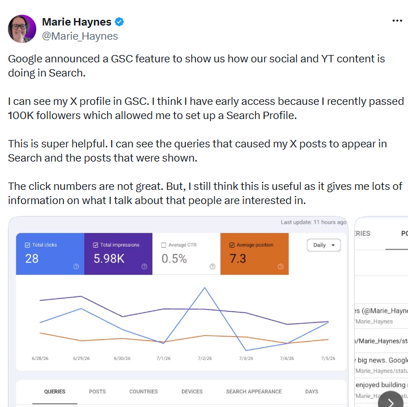
This is most beneficial for anyone managing brand accounts without an owned domain, including creators and social-first businesses, who can now pull real Google Search performance data without a website property.
Until now, Search Console gave limited visibility into social content unless it was connected to a verified site or appeared indirectly in other reports.
Search Console social media tracking used to mean nothing, because Search Console simply didn’t know your Instagram account existed unless it was linked to a verified site.
Platform properties support the following four platforms:
- TikTok
- X
- YouTube
What Platform Properties Don’t Cover Yet
Facebook and LinkedIn are both missing from the initial rollout, which is a real gap for B2B teams. If you’re running LinkedIn-heavy campaigns for a SaaS client, there’s still no Google side lens into how those posts perform in Search. Google might expand the list eventually, but there’s no confirmed timeline yet.
How to Track Social Posts in Google Search?
It’s relatively easier to set up because it relies on platform authorization, which can’t be said for other Search Console workflows. Here’s a step-by-step breakdown:
- Open Search Console and click the property selector dropdown in the top left.
- Choose “Add property.”
- Select Instagram, TikTok, X, or YouTube from the platform property options.
- Follow the verification prompts to authorize Google’s connection to that account.
What Reports You Get Once You’re Verified
You get three report types for each platform property:
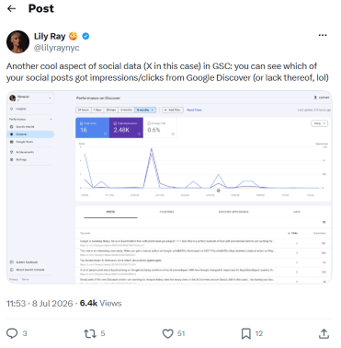
- Performance report: Clicks, impressions, click-through rate, and average position, all filterable by individual post and by the actual search query driving traffic. This is the piece SEOs will care about most, because it finally answers the question clients keep asking: “Does my Instagram content even show up when people search for us on Google?”
- Insights report: An aerial overview of traffic trends, top-performing posts, and ways people are discovering your account through Google Search specifically.
- Achievements: Track growth milestones based on clicks over time. This is a nice boost for smaller creators who want to visualize momentum.
What’s Different with Search Console YouTube Performance?
YouTube already had some visibility inside Search Console through indexing reports tied to verified channels linked to a site. Now Search Console YouTube performance data is available even without a linked website, and you can view Search and Discover data separately rather than getting general site metrics and sorting it out by yourself.
If you’re a link building agency also managing YouTube content, you can now see exactly which search queries are surfacing specific videos, and get actual data to inform title and description optimization instead of guessing based on YouTube’s native analytics, which was never built with Google Search visibility in mind.
Search Console Instagram Data
Search Console Instagram tracking answers a question that’s been a black box for years. Instagram content, especially Reels and Stories, shows up in Google Search results, but there was no clean way to measure it.
According to Google’s own documentation on the feature, Instagram Stories that appear in Google Search results are now counted as impressions within the platform property, giving you visibility into ephemeral content performance that previously vanished the moment the story expired natively. This is good news for brands running Story-heavy campaigns, since they now have a permanent record of Search visibility even after the content itself disappears from the app.
For link building and content teams, this is a chance to finally connect the dots between the content clusters you’re building on-site and the social distribution supporting them. Platform properties make it easier to compare on-site content visibility with off-site social traction.
This is an excellent opportunity to start correlating which blog topics are also generating Search-visible social traction, and double down on formats that are working in both channels simultaneously for a more cohesive strategy.
What This Means for Your Link Building and Content Strategy
Platform properties will not show you the number of backlinks, but they do tell you which social and video posts are being discovered through Google. So, if a Reel or X post gets deep impressions for a high-value query, that’s an opportunity to inform digital PR angles, outreach topics, and on-site content ideas that may be worth turning into a blog, case study, statistic page, or outreach asset.
6 Ways to Use Platform Property Data in Your SEO Strategy
The impression numbers you gain from platform properties are genuinely useful for SEO work if you know where to look, and most of the value isn’t in the vanity metrics. The devil is in the (query level) details, and you should build a workflow around those.
1. Find Queries That Trigger Social or Video Posts
The performance report shows you the actual search terms sending clicks to your Instagram posts and YouTube videos. This real query data is the same category of information you’ve been squeezing out of your website’s Search Console property for years, except now it’s tied to content you probably never thought to optimize for search at all.
Pull this list, and you’ll find two things: queries you expected, and queries that make you go “wait, people search for that?” If a Reel or post is picking up impressions for a query you’ve never considered, you now have insights about demand you never thought of addressing. Use this to your advantage.
2. Turn High-Performing Social Topics Into Blog Posts, Landing Pages, or Resource Pages
A query list is less of a social metric and more like keyword research, which will help you identify useful content gaps.
For example, a social media post about “how to disavow toxic backlinks” has high Search impressions, and your blog has nothing ranking for that exact phrase; you’ve just found a content gap using real behavioral data instead of a keyword tool’s guess at search volume.
Normally you research a topic, then create content across formats. Here, the social content came first and proved the demand, and now your job is backfilling the owned asset that should have existed already.
3. Improve YouTube Titles and Descriptions Based on Search Queries
YouTube optimization has always involved a bit of guesswork. You’d look at YouTube’s own search suggestions, maybe run a video title through a keyword tool built for web search, and hope the overlap was close enough. You can skip the guesswork and use platform property to identify the Google Search queries driving clicks to certain videos.
For example, a video on “Link Building Basics” is getting clicks for a corresponding query along the lines of “how to build backlinks for a new website”. This tells you to use this specific phrase as the title and within the description instead of letting it get lost in the description.
4. Compare Website Rankings With Social or Video Visibility for Branded and Non-Branded Searches
Here’s a comparison most reports never made possible before: how does your website perform in Search for a given topic versus how your social content performs for that same topic?
Run a comparison on branded terms first. If someone searches your brand name and both your website ranking and social impressions complement each other, you’re good.
Next, run topic-level terms. You might find disparity between your website and social rankings for certain topics or related queries. That’s a signal your site’s content on that topic needs work, and it’s evidence your audience already cares about it, so the investment isn’t a gamble.
5. Use Social Posts That Gain Google Impressions as Evidence for Content Demand
If a social post about a niche topic is generating hundreds of impressions in Google Search without you doing anything to push it there organically beyond posting it, that’s real demand showing up on its own.
6. Report Creator or Social Visibility as Part of Overall SEO Performance
Last one, and it’s more about how you present your work than what you do with the data itself. Social performance and SEO performance have historically lived in separate reports, run by separate teams, presented in separate meetings. That’s always been a little artificial, since both are ultimately measuring the same thing: whether people are finding your brand through search. Platform properties give you a legitimate reason to merge those two stories into one report.
You Know How It Works. Let Us Run It.
Book a call with a strategist or check out our services to find the best fit for you.

Written by LBHQ Editorial Team
Strategists and outreach leads who've shipped 4,000+ links and recovered dozens of penalized domains.