Have you ever visited a site that deeply annoys you with its user experience? Maybe it’s slow, cluttered, or hard to navigate. You’re in there for a while, and the next moment you’re out, you’re making a promise that you’ll never return. I’ve been there, done that.
Or if you own this site and look at its parts, you think it can be better, the best, the goddamn perfection. I know the feeling.
There’s one and only thing that can make it happen for you – the Website Audit.
And if you don’t know enough about it or anything about how to do a website audit, no worries! We’ve got you covered. This comprehensive blog will serve as your ultimate guide to Do Basic DIY Website SEO Audits, covering everything you need to know, including practical tips using Ahrefs.
So, without further adieu, let’s get into it!
How to Do a Website SEO Audit | Step-by-Step Guide
While website audits aren’t done every day or week, they’re extremely necessary to ensure that your website is functioning okay, adheres to Google's policies, and provides an apt user experience. A good website audit will not only inform you about any and every issue being faced by your website, but will also help you identify how you can make amends. However, in-depth website audits don’t come cheap. You’…
Watch: How to Do a Website SEO Audit | Step-by-Step Guide (15 min) · Watch on YouTubeWhat you'll learn
0:09
Let's do a website audit. But what is it actually? And why is there a need to perform it routinely?
0:15
And what tools do you need for it? I'll answer all those questions in today's video on a basic DIY
0:24
website audit. Well to put it simply a website audit is a thorough analysis of your website.
What is a Website Audit?
0:31
It allows you to examine your site for SEO, User Experience, Design, Content, and Technical issues.
0:40
It helps you deep clean your website. Just like how you'd clean your house before a guest visits
0:47
you. You want your website to look its best before visitors come to see it. As a matter
Benefits of a Website Audit
0:52
of fact, performing a website audit offers you long-term benefits. For example: Identifies issues
0:59
that may hinder your website to rank high on the SERPs, Improves your SEO and your conversion
1:05
rates, Increases the flow of incoming traffic, Sprucifies the existing design, and eventually
1:12
impacts user acquisition. It's a good idea to conduct a website audit at least twice a year.
How often should you conduct a Website Audit?
1:19
However, if you make frequent updates to your site or publish content monthly, then it's a
1:25
good idea to perform a website audit every quarter. And before we dive into this video
1:29
I'd like to preface the importance of hiring a professional site auditor to do the job. We're
1:35
only skimming the surface of how to perform a website audit, which in itself is quite extensive.
1:41
And a professional is going to be approaching it with an expert skill level that comes with time.
1:46
Something that you can't just get with watching a YouTube video. But, we're going to do our best
1:52
to show you what you should be looking for if you are doing it yourself. But where do you begin? Well,
Tools you can use for a Website Audit
1:59
you can pick from a bunch of free or paid tools, such as Moz, ahrefs, SEMrush, Ubersuggest, Screaming
2:06
Frog, and SE ranking. In this video, I'll use ahref's paid version to audit the link building HQ site.
Choosing between Ahrefs Paid and Free version
2:14
ahrefs, is a feature-rich and all-in-one SEO tool. It's Site Audit feature crawls websites for over a
2:21
hundred pre-defined SEO points and gives details on everything right or wrong with your website.
2:28
Just like your mom pointing out every little flaw in your room. But in order to access all of ahref's
2:34
features you need to pay for it. So if you have the budget go for it. Consider it an investment.
2:41
Or you can use ahref's free version the Webmaster Tools. It allows you to use the Site Audit and Site
2:48
Explorer features, but only for the websites you own, which can be quite limiting. But the
2:54
question is why would anyone use ahref's paid version when the free webmaster tools exist?
3:01
Because with the paid version you can run Site Audits on competitors' websites as well, and get
3:07
an in-depth analysis of their SEO strategy. And to perform a website audit the way we're doing it
3:13
you'd also need Keyword Explorer and Content Explorer, which aren't available in the free
3:19
version. And there are other limitations as well. So pick the right tool depending on your budget
3:26
and needs. Beginning the website audit process, I open ahrefs go to the Site Audit option and
Beginning the Website Audit Process
3:33
let the crawl run on my website, which is already saved on my list of projects.
3:37
It takes some time depending on the size of the website but don't worry. Grab a coffee, watch some
3:43
cat videos on YouTube, and wait for it to finish. In case you're starting from scratch and have a
Auditing a new website
3:49
new site to audit, you need to create a new project for that. Hit that orange button and
3:55
add your site. Then go through the simple steps of choosing your scope, verifying ownership, picking
4:01
specifics for your Site Audit, Rank Tracking, and mentioning your competitors. Schedule daily weekly
4:08
or monthly crawls for your project. Site Audit will run these automatically and save each crawl data.
4:15
While my crawl is running in the background, let's talk about the Design and UX assessment. Your
Assessing your website's Design and UX
4:22
website's design is like a book cover. It's the first thing people see and they can either draw
4:26
them in or turn them off. You want your website to be like Harry Potter, not Barry Trotter. To study
4:36
the typical user behavior of your site use heat map generating tools. They let you see what parts
4:42
of the page are drawing the most attention in clicks. And in this way it can be a good starting
4:47
point to analyze how users are interacting with your site. You can use Smartlook, Crazyegg, or
4:54
Hotjar whichever fits your needs. Next you can assess your website's UX by answering the
5:00
following questions: How are the overall Aesthetics? Appealing or Annoying? Is Page structure easy to
Asking the right Questions to assess UX
5:07
distinguish and navigate? These include Headers, Main Body, Footers Titles, Sidebars, Topbars. Is
5:14
design leading to interactive elements present on the web page? Is your media properly optimized and
5:20
coherent in style? Is the user Journey free of all sources of frustration? If you answered yes to most
5:28
of these questions, congratulations your website's killing it. But if you answered no don't worry you
5:35
can still save the day by redesigning your website. Just make sure that there's consistency between
5:40
Fonts, Styles, and Colors, and no annoying pop-ups or distracting banners. But that's not it. There are
5:47
more aspects that add up to a good user experience. Like site speed A/B testing and funnel conversions.
5:55
But here we focused more on the fundamentals rather than cramming in all of the information
6:00
related to UX. That could be a separate video. Let us know in the comments if that's
6:06
something you'd like to see. And don't forget to subscribe and hit that notification Bell.
Finding and Fixing Website Issues
6:11
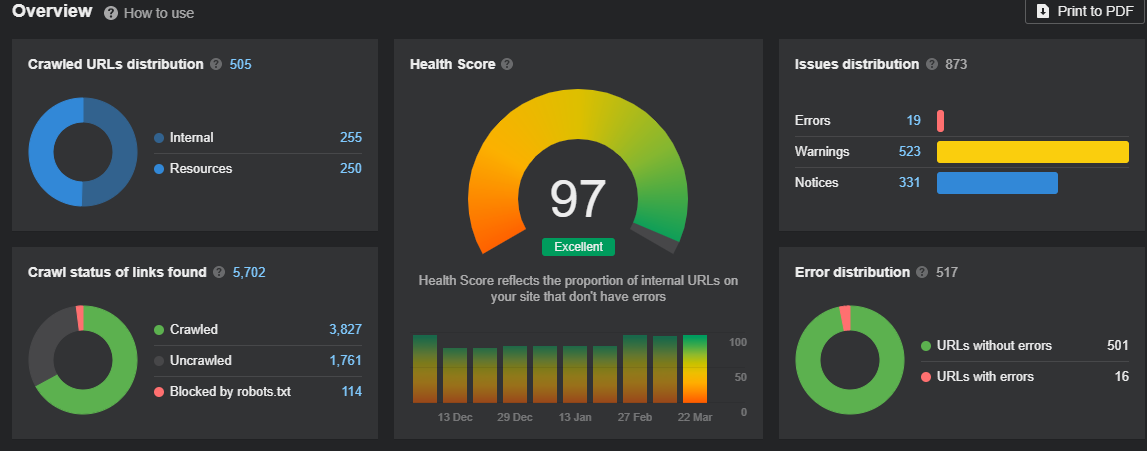
Okay so my website crawl is complete. Let's see what we got. The first thing I see is the overview.
6:17
It shows the Health Score, URL crawl data, Errors, and Issues distribution. As I scroll down, I see
6:25
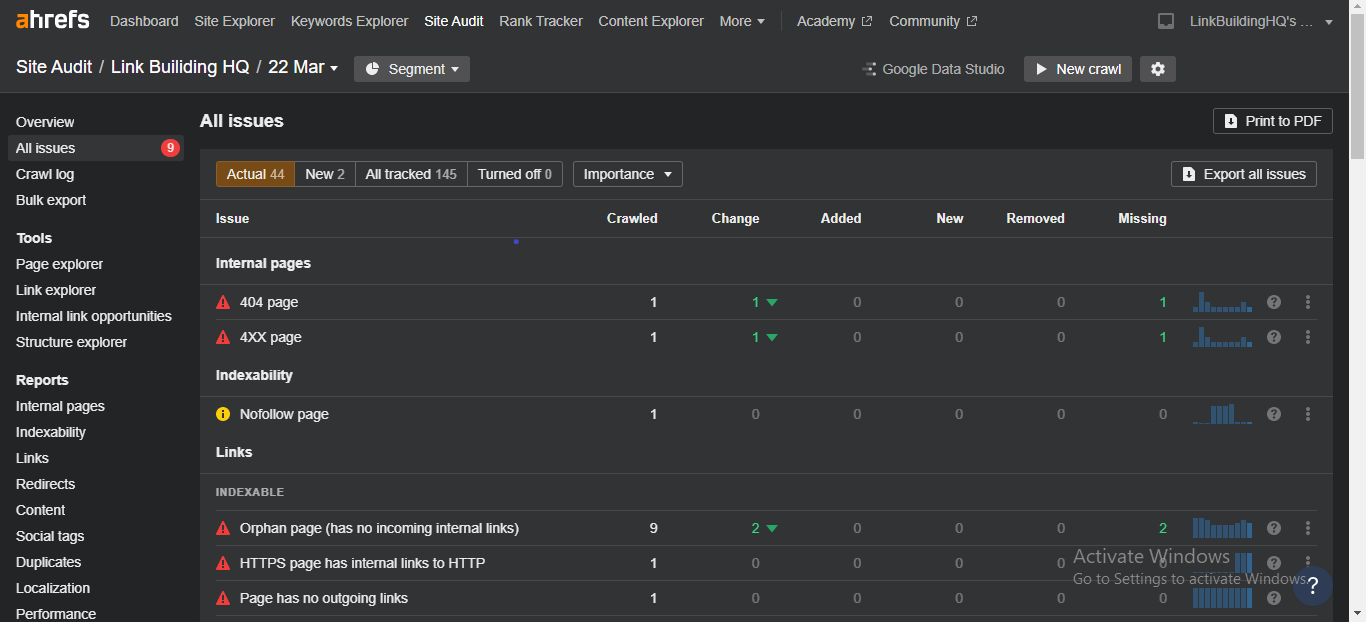
all the issues listed, and the total number of URLs affected by them. By clicking on view "all issues",
6:31
I'm able to see issues in different sections. Like Internal Pages, Indexability, Links, Redirects,
6:38
Content Visuals, Social Tags, Sitemaps, and others. If you click on that little "question mark" at the
6:46
extreme right, it'll tell you how to fix the issue. And it works for every kind of SEO issue your site
6:51
has. You can see the importance filter at the top, divided into error, warning, and notice. So you can
6:58
set your priority and start resolving the issues accordingly. By clicking on a number beside any
7:04
issue it shows you the list of affected URLs and the relevant details. You can hit the "export" button
7:10
and forward them to your Dev team, or if you are your Dev team you can start resolving the issues.
7:18
Good luck! And site audit not only detects issues individually, but also by category.
Checking the website based on performance
7:26
Okay that's enough of the overview, let's check out the Website Performance Option. It allows you
7:31
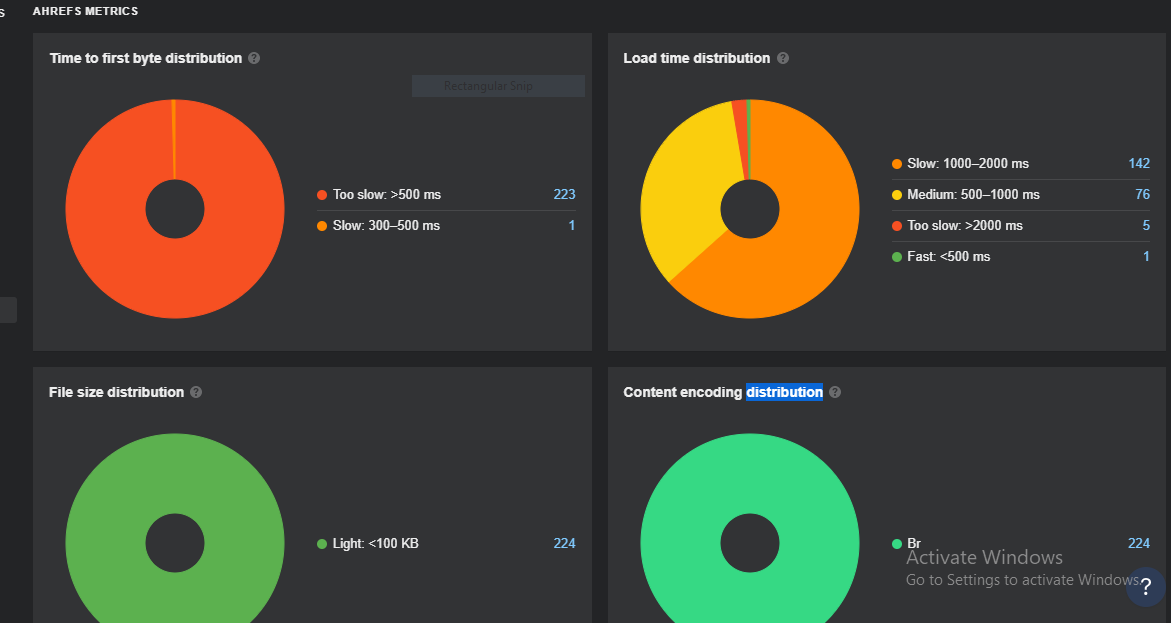
to test the site's functionality and load times. On ahrefs Site Audit I go to the Performance Tab.
7:37
Where I can see the visual breakdowns of the various page speed metrics. Each section of
7:42
the page speed is clickable, and it takes you to lists of affected Pages. You can easily figure out
7:48
your slow pages, export the CSV and you know the drill. SEO Pros should also use Google "PageSpeed
7:56
Insights" to check the site's performance. But it only shows you a single page's performance at a
8:02
time, and not the bulk data of all internal pages so you'd have to insert a specific URL, if you
8:09
wanted the data for a specific page, and that could be annoying if your website had tens, hundreds, or
8:15
even thousands of pages. Moving on, let's have a round of SEO check. An SEO audit will let
Conducting an SEO Audit
8:23
you decide whether your website is optimized for search engines or not. It gives you the rundown of
8:29
existing lackings, along with opportunities to rank better and to bring in more traffic. On ahrefs to
8:36
check your indexed pages go to the "Indexability Report" and have a look at your total number of
8:41
internal pages, indexable pages, and non-indexed Pages. Don't worry they're not being held in
8:47
SEO jail they're just grounded at the moment. All figures in numeric data are clickable, which allows
Assessing Website Content
8:55
you to see how many of your pages are registered by Google, and what's the reason why the rest are
9:00
not. Now it's time to check the keywords bringing in large amounts of organic traffic. For that I'm
9:06
using Site Explorer. By clicking on the "Organic Keywords", I can see all the keywords my website's
9:11
ranking for. It also gives you the details of volume, keyword, CPC, traffic, and other important
9:18
metrics. To find new keyword opportunities you can use the Keyword Explorer on the top. It allows you
9:25
to see thousands of keywords in seconds for Google, YouTube, Amazon, and many other platforms. To find
9:32
which pages are doing best on the SERPs, go to the "Top Pages" option. This will let you see which of
9:38
your pages are receiving the most organic traffic. Conducting an SEO audit provides a good outlook on
9:44
your website. With the right data, you can classify your best-performing pages and keywords, find new
9:50
keyword opportunities, and plan your new content accordingly. Let's talk about Content. The stuff
9:58
that makes your website worth visiting. But not all content is created equal, and that's where Content
10:04
Assessment comes in. Where you can remove the underperforming low-quality content and Elevate
10:10
the high-quality content to Superstar status. on ahrefs, the Content Tab lets you see all the
10:18
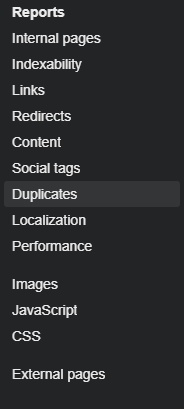
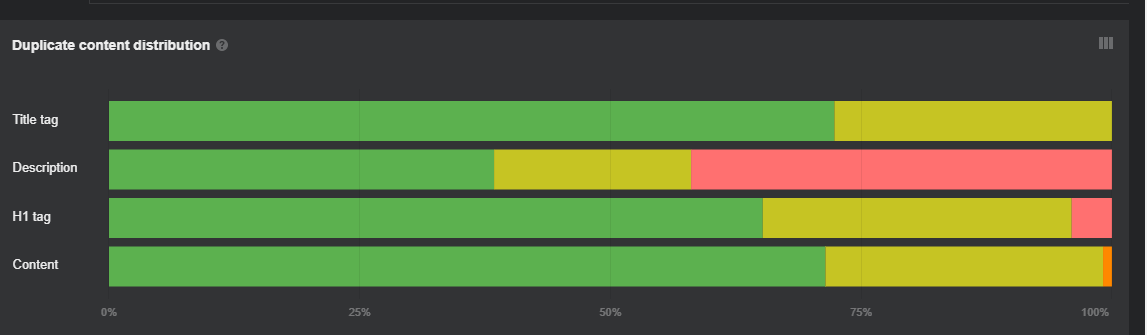
existing issues of metas, headings, and word count. Then check out the Duplicates Tab to remove the
10:24
unnecessary content clones stealing the spotlight. To find out what kind of content is working or not
10:30
go to Site Explorer and check out Top content and Top Pages. This will give you a good idea
10:36
of what's most popular with your target audience. And what new content pieces you should be creating.
10:42
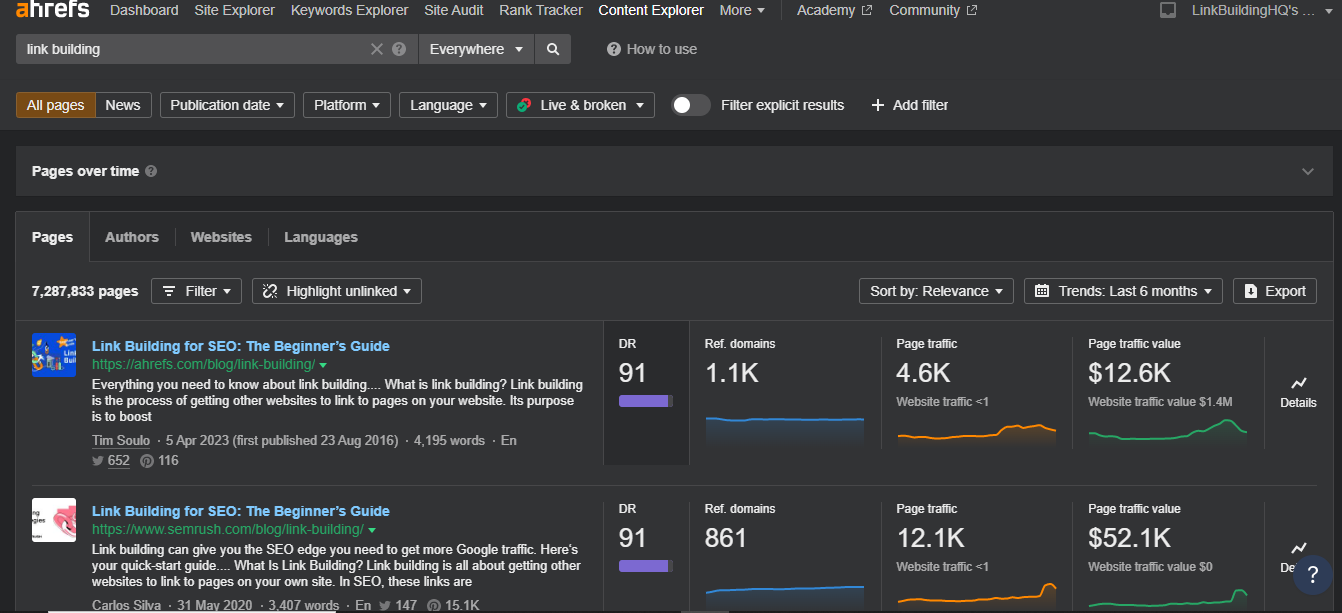
Speaking of content ideas, check out the Content Explorer on the top bar to find new opportunities
10:49
and to check out what kind of Articles get the most traffic and referring domains. And yes it's
10:56
also important to assess website content for the following things: Does it follow Double-EAT and
11:01
other important Google updates? Is there a need to repurpose or update previous content according to
11:08
the latest trends? What are the incompetencies seen in the content compared to competitors' websites?
11:15
This will help you Garner pristine data and execute necessary actions, like alter,
11:21
remove, or improve, your content. And in case you're unfamiliar with Double-EAT or the other content
11:27
related updates check out our other videos here. Moving on to last but certainly not least, Backlink
Backlink Profile Assessment
11:34
Profile Assessment. In ahrefs, backlink research is just to the next level. Having the biggest
11:41
index of over 35 trillion backlinks, it's one of the best tools for Backlink Profile Assessment.
11:47
I go to Site Explorer and click "Overview". It shows the number of referring domains and backlinks. You
11:54
can compare this data to your competitors, and figure out how many more quality backlinks you
11:59
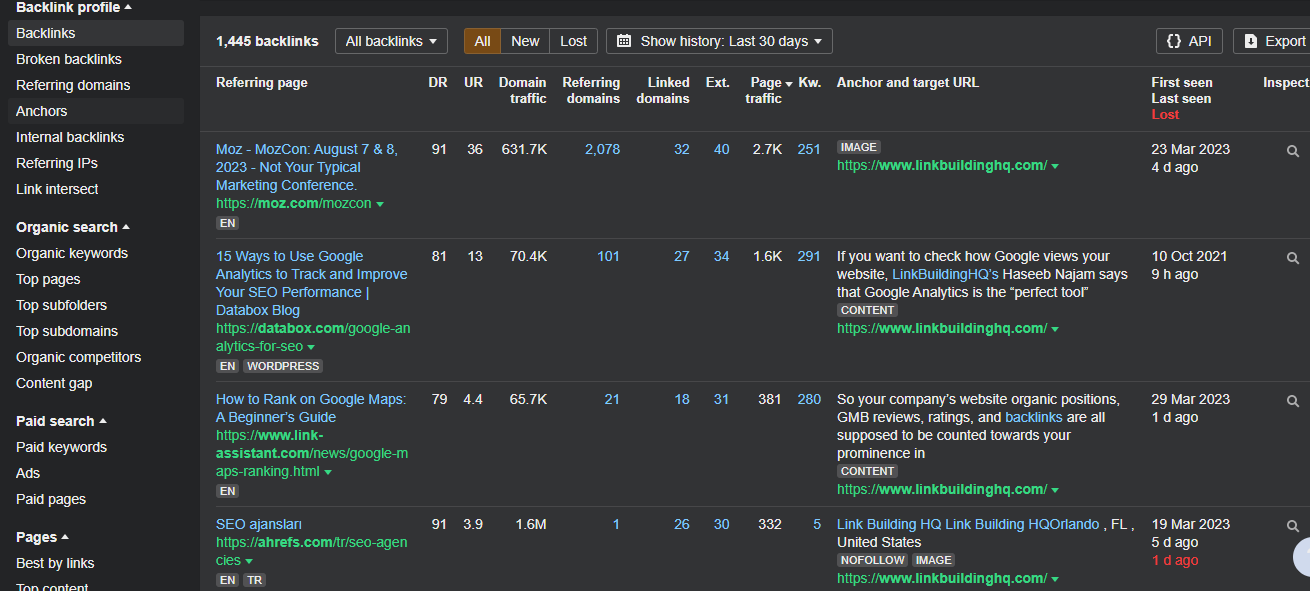
might need. Next, I go to the "Backlinks" option. Here I can see All, New, and Lost backlinks, and a whole
12:07
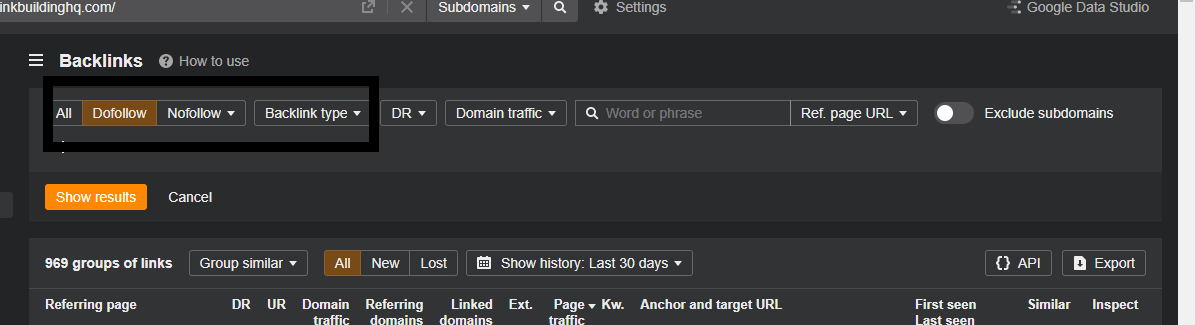
lot of essential data which can help me strengthen my backlink profile. Choose to only see Dofollow
12:13
or Nofollow. You can pick a backlink type as well. You can also see broken backlinks and if by chance
12:20
you have any, proceed to take the necessary actions. Like, asking the host to change the link, or setting
12:26
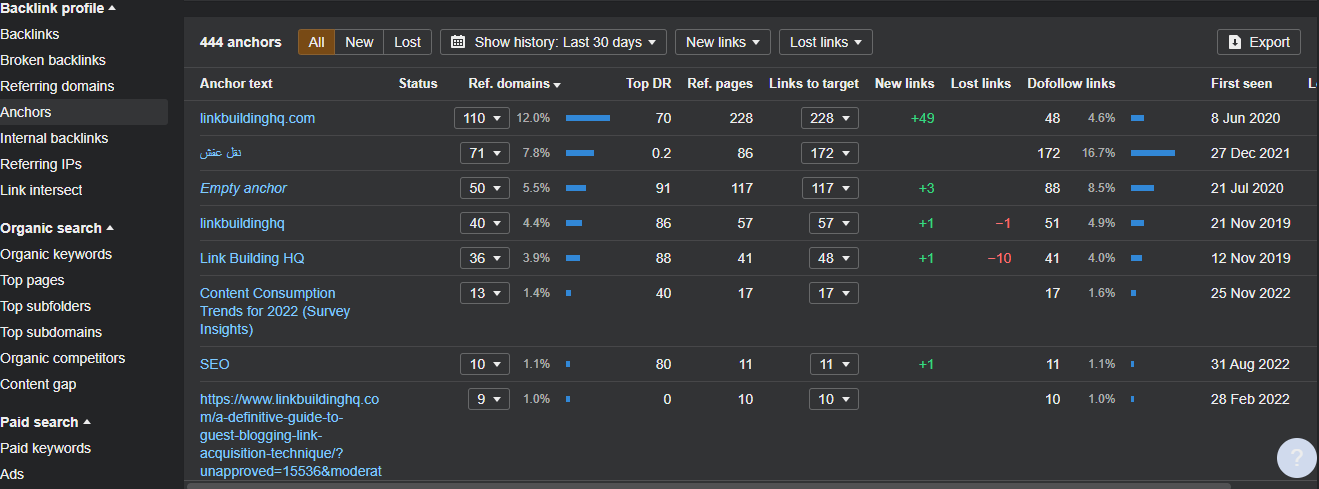
up 301 redirects. Now let's talk about anchor texts go to the "Anchors" option on the sidebar, and look
12:34
out for any spammy or dodgy anchor texts. If you end up seeing some irrelevant or unexpected stuff,
12:40
just click on that anchor text check out the full report and investigate further. Lastly check out
12:47
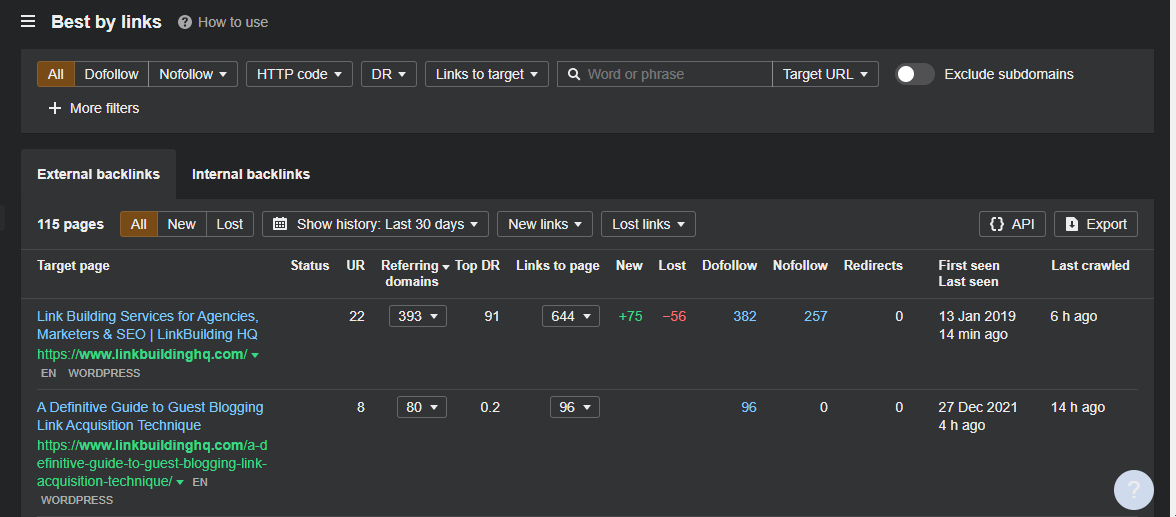
Best Buy Links Report. This shows you the web pages that attract the most links from different domains.
12:53
This gives you a clear idea of what content type gets noticed more than the others. In addition, you
13:00
can generate the same report for competitors and detect linkable content ideas that you're missing
13:05
out on. Wrapping this up analyzing your backlink profile is extremely important, because backlinks
13:12
are vital for ranking and building authority. Remember, the choice of audit tool depends on
13:18
your specific needs and budget. However, if you're looking for every SEO tool feature Under the Sun
13:24
and have the budget to match ahrefs is the tool for you, even though they are not sponsoring this video.
13:32
Nobody's sponsoring us. So no matter what tool you use, frequent website audits are necessary.
Why are Website Audits necessary?
13:39
They ensure that your site is up to date, issue-free and that it conforms to SEO standards. It's
13:46
in your best interest to make sure that you're keeping up with this important facet of your SEO.
13:51
Whether you're doing it yourself or hiring a professional. Did you know that every time
13:57
someone subscribes to our Channel, a kitten is saved? Every time our notification Bell is
14:04
rung a unicorn lays an egg. Every time one of our videos is liked I dance the dance of my ancestors.
Questions from this episode
What is a website audit?
A website audit reviews your site’s technical health, SEO, content, design, and user experience to identify issues and opportunities for improvement.
Why are website audits important?
Website audits help uncover problems that can affect search visibility, website performance, and usability. They also help you prioritize fixes.
How often should you conduct a website audit?
Conduct a comprehensive audit every three to six months, depending on your website’s size and how frequently it changes. Additional checks are useful after a redesign, migration, or unexpected traffic drop.
What tools can you use for a website audit?
This video demonstrates auditing with Ahrefs. You can also use Google Search Console, Google Analytics, and PageSpeed Insights to investigate search performance, visitor behavior, and page speed.
Do you need paid tools to audit a website?
You can start with free tools to identify many common issues. Paid tools can provide broader crawling capabilities and more detailed analysis, depending on your needs.
What should a website audit include?
Review technical issues, crawlability, indexing, page performance, mobile usability, navigation, on-page SEO, content quality, and your backlink profile.
How do you assess website content during an audit?
Look for outdated information, duplicate pages, content gaps, and pages that do not meet search intent. Prioritize updates that make your content more useful and relevant.
Why should you review your backlink profile?
A backlink review helps you understand which websites link to yours, assess their relevance, and identify changes or unusual patterns that need investigation.
Can you conduct a website audit without a developer?
Yes. You can identify many SEO, content, and usability issues yourself. More complex fixes involving code, hosting, or site architecture may require a developer.
Will fixing audit issues improve search rankings?
Fixing issues can improve your website’s accessibility, usability, and search performance. Ranking improvements depend on several factors and are not guaranteed.
What is a Website Audit?
A Website Audit is an important procedure that analyzes your site in terms of its performance, user experience, design, SEO, and content. It lets you see how your site is performing according to standard metrics.
When you conduct a comprehensive audit of your site, you find glaring issues that need to be fixed. The specific functional areas that need your extra attention. Then, you should proceed to eradicate the existing bottlenecks, resolve issues, and get ready to receive incredible benefits from it.
Benefits of the Website Audit
As a matter of fact, not only does performing a website audit allow you to identify strengths and weaknesses, but it also offers you long-term benefits, for example:
identifies critical performance issues that may hinder your website from ranking high
reduces usability issues
boosts search engine visibility
improves your conversion rates
increases the flow of incoming traffic
revamps the existing design
and eventually increases your revenue
It’s a good idea to conduct a website audit at least twice a year. However, if you make frequent updates to your site or publish content every month, then it’s better to perform an audit every quarter.
Moving on, let’s talk about our chosen website auditing tool – Ahrefs.
Ahrefs Vs. Ahrefs Webmaster Tools
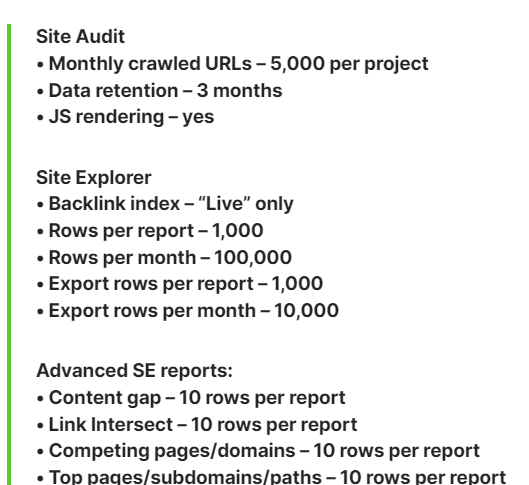
Ahrefs is a feature-rich and all-in-one SEO tool. Its Site Audit Feature crawls websites for over 100 pre-defined SEO points and gives details about everything right or wrong with your website. But, in order to access all of Ahref’s features, you need to have a paid version. So, if you have the budget, go for it!
Or you can use Ahrefs’ free version – the Webmaster Tools. It allows you to only use Site Audit and Site Explore features, but only for the websites you own. This works, but it can be quite limiting.
But the question is, why would anyone use Ahrefs’ paid version when the free Webmaster Tools exists?
With Ahrefs Paid Version, you can run a site audit on competitors’ websites as well and have an in-depth analysis of their SEO strategy.
With Ahrefs Webmaster Tools, you can only explore and audit your own Verified Sites. In fact, you can’t access Keyword/Content Explorer and Rank Tracker, which are necessary to perform a comprehensive website audit.
And there are other limitations as well.
Now, let’s look at the breakdown of the important aspects of the website audit:
What are the aspects of the Website Audit?
Before you jump in, you always need to have a list of items/areas that you would need to review in detail. This SEO checklist will serve as a basis for improving your website’s overall outlook and performance in the SERPs. Here’s a checklist of areas you should assess:
Design and UX Assessment
Your website design is your first introduction to users; it holds the power to draw them in or turn them away. It must be visually appealing and deliver a superior user experience. So, it must be engaging.
A nice website design offers smooth navigation, rightly placed menu bars, clean classification of pages, clear URL structure, and internal links that support the user experience. In no way should it be cluttered or hard to navigate or have any annoying popups that obstruct the view of the page.
You can assess a website’s UX by answering the following queries.
Is page structure easy to distinguish and navigate? These include headers, main body, footers, titles, sidebars, topbars, etc.
Is the design leading to interactive elements present on the webpage?
Is your media properly optimized and coherent in style for a smooth transition?
Design should support user flow in a way that a user can go back to any stage, undo a certain action, perform changes, and more.
In case you answered “Yes” to most of these questions, your website design is killing it! But if you answered “No”, don’t worry, you can still save the day by making the required improvements. Ensure consistency between fonts, styles, and colors, and no annoying pop-ups or distracting banners.
You can also test your site’s usability/user experience by receiving feedback from multiple users. Ask them to give their views on the site’s navigation, content quality, and ability to see and respond to calls to action.
And this is not it, there are more aspects that add up to a good user experience, like, site speed, A/B testing, and funnel conversions. But here, we’ve focused more on the fundamentals rather than cramming in all the information related to UX.
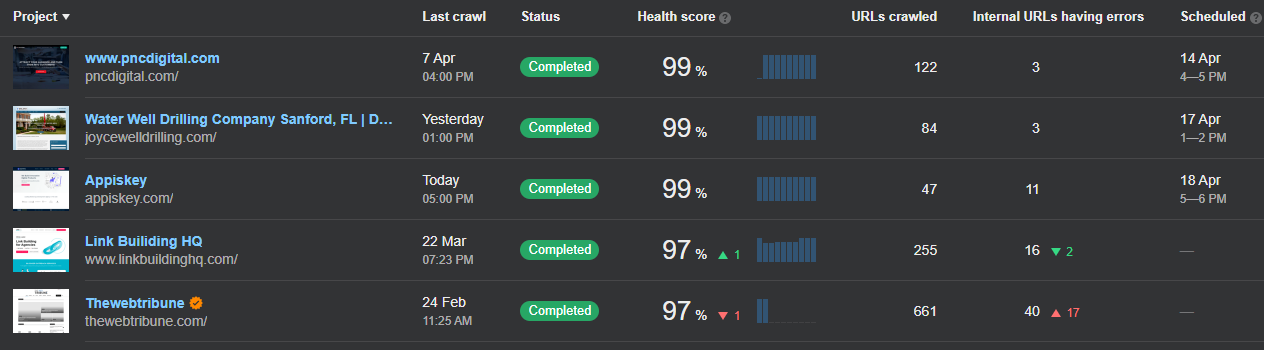
To begin the website audit process, I open Ahrefs, go to the Site Audit option, and let the crawl run on my website, which is already saved in the list of projects. It takes some time, depending on the size of the website.
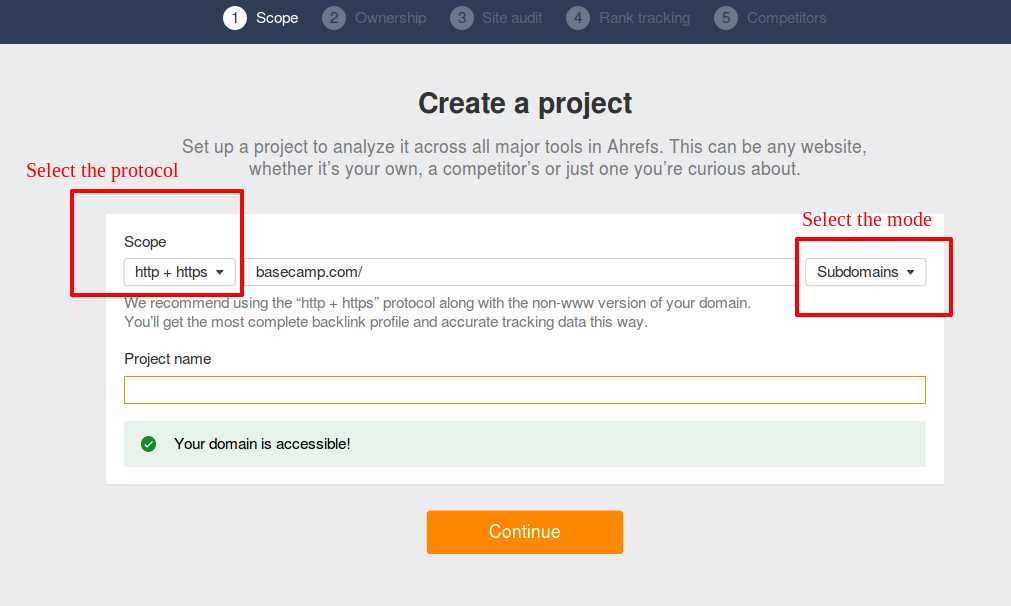
In case you’re starting from scratch and have a new site to audit, you need to create a new project for that. Hit that orange button, and add your site.
Then go through the simple steps of choosing your scope, verifying ownership, picking specifics for your site audit, rank tracking, and mentioning your competitors.
Schedule daily, weekly, or monthly crawls for your projects – Site Audit will run these automatically and save each crawl data.
After a while, my website crawl is complete. Let’s look at what we’ve got.
The first thing I see is the Overview. It shows the health score, URL crawl data, errors, and issues distribution.
As I scroll down, I see all the issues listed and the total number of URLs affected by them. By clicking on ‘View All Issues’, I’m able to see issues in different sections, like internal pages, indexability, links, redirects, content, visuals, social tags, sitemaps, and others.
If you click on that little question mark at the extreme right, it will tell you how to fix the issue, and it works for every kind of SEO issue your site has.
You can see the “Importance” filter at the top divided into error, warning, and notice. So you can set your priorities and start resolving issues accordingly.
By clicking on a number beside any issue, it shows the list of affected URLs and the relevant details. You can hit the export button to forward them to your dev team. Or, if you are from the dev team, you can start resolving the issues. Good luck.
This Site Audit not only detects issues individually but also by categories.
Okay, that’s enough for the overview; let’s check out the Website Performance Option, but let’s get to know its concept first.
Website Performance
We don’t stay on a page that takes forever to load, so how can you expect your users to have that amount of patience? Unfair, right?
Your Website Performance plays a major role in bringing in traffic and increasing conversion rates. In addition, site speed is also one of Google’s ranking factors. So, if your website is slowed down, there are low chances of it receiving a high amount of organic traffic.
There are two important things you should focus on to improve your website performance.
Detect pages with slower load times and optimize them to load faster.
Hosting service makes a difference in your website performance, too, so pick the right one because there’s a drastic difference between a hosting service that offers $5p/m and one with $100 p/m.
So, to check out my Website Performance Option, I go to the Performance tab, where I can see the visual breakdown of the various web speed metrics.
Each section of the page speed is clickable and takes you to lists of affected pages. You can easily figure out your slow pages, export the CSV, and you know the drill.
SEO pros also use Google Pagespeed Insights to check the site’s performance. But it only shows a single page’s performance at a time and not the bulk data of all internal pages. So, you’d have to insert a specific URL to see data for a particular page. And that could be annoying if you have a website with tens, hundreds, or even thousands of pages.
Moving on, let’s discuss the SEO part.
SEO Assessment
Analyzing your existing SEO strategy allows you to find issues, explore new keyword opportunities, and make improvements. Conducting the whole procedure gives you an insight into every major and minor technical-related SEO problem.
Some of the most common SEO roadblocks are non-indexed pages, 404 errors, and broken internal links. These can be real enemies to hurt your rankings and elevate the bounce rate. And it is a fact that most of the time, you remain unaware of these issues until you run a comprehensive site audit.
In other cases, your ranking may drop after Google rolls out the new update. So, it’s smart to look over your SEO and find some improvement opportunities.
Let’s have a round of SEO-check now.
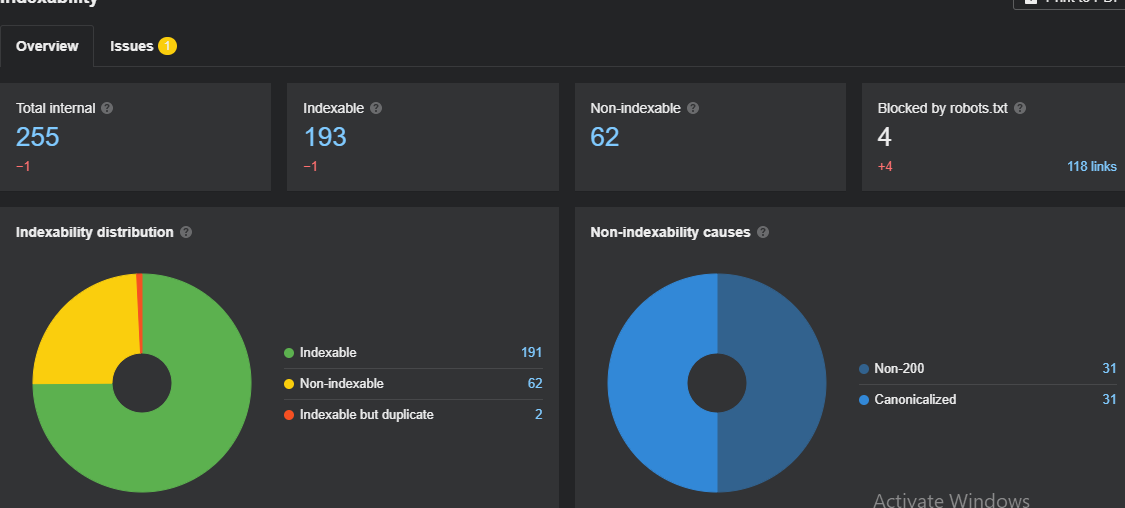
On Ahrefs, to check your indexed pages, go to the indexability report, and have a look at your total number of internal pages, indexable pages, and non-indexed pages – don’t worry, they’re not being held in SEO jail, they’re just grounded at the moment.
All figures and numeric data are clickable, which allows you to see how many of your web pages are registered by Google, and what’s the reason if the rest are not.
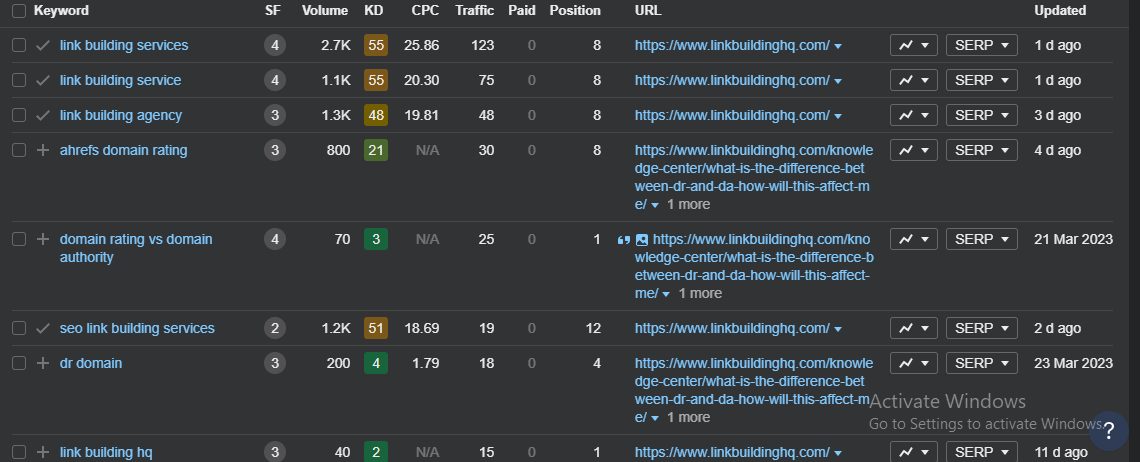
Now, it’s time to check the keywords bringing in a large amount of organic traffic. For that, I’m using Site Explorer. By clicking on the organic keywords, I can see all keywords my website is ranking for. It also gives the details of volume, keywords, CPC, traffic, and other important metrics here.
To find new keyword opportunities, you can use the Keyword Explorer at the top. It allows you to see thousands of keywords in seconds for Google, YouTube, Amazon, and many other platforms.
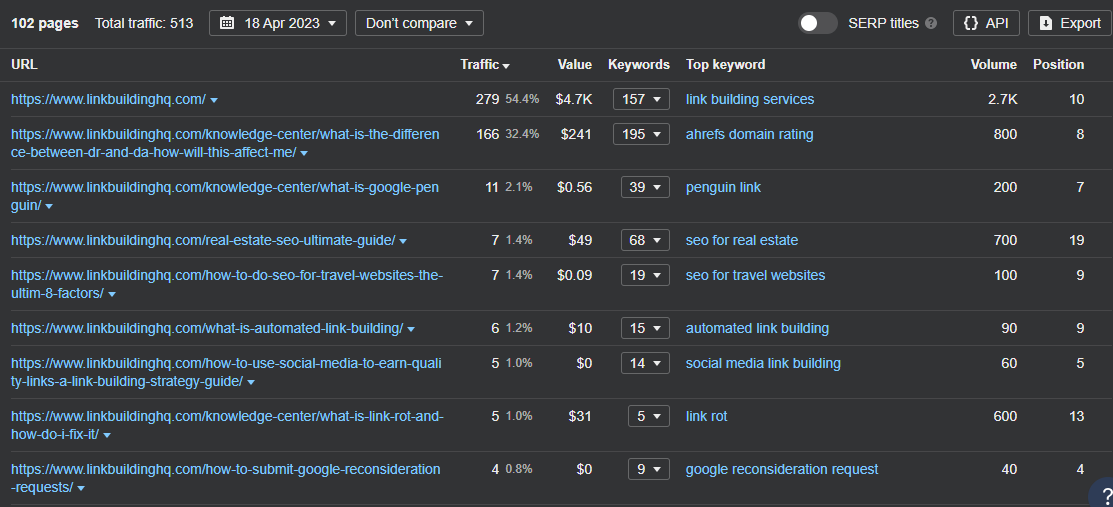
To find which pages are doing best on the SERPS, go to the Top Pages option. This will let you see which of your pages are receiving the most organic traffic.
Conducting a search engine optimization audit provides a good outlook on your website. With the right data, you can classify your best-performing pages and keywords, find new keyword opportunities, and plan your new content accordingly.
Content Assessment
It doesn’t matter if your website is filled with visually appealing design and has flawless SEO. If it lacks quality content, sorry to break it to you; it’ll be a real struggle to rank. And note that if your content is fully optimized for the search engine but devoid of standard quality, it’s still not gonna rank as well.
At this point, Content Audit or Content Assessment comes in. The process, in its entirety, lets you remove low-quality content and good-quality content and find content opportunities.
Speaking of which, we need to highlight the importance of content gaps over here. It informs that you’re missing out on the topics that your audience is looking for. And on top of that, most of your competitors are already leveraging on such opportunities. So, it’ll be a smart move to create new content pieces based on those topics and get noticed.
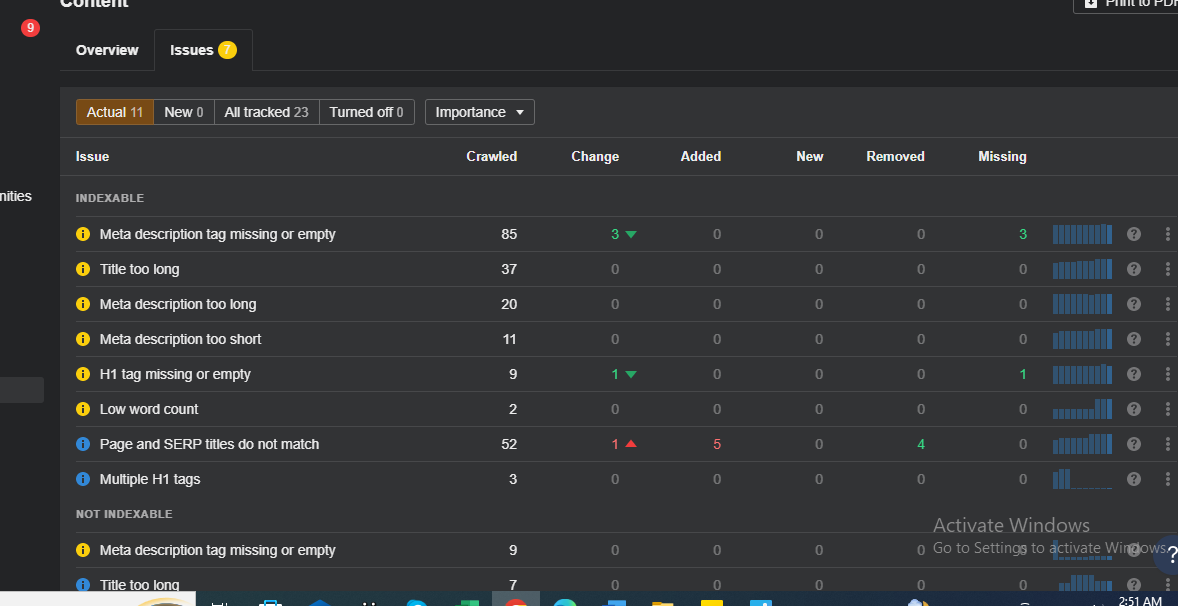
On Ahrefs, the Content Tab lets you see all the existing issues of metas, headings, and word count.
Then check out the Duplicates Tab to remove the unnecessary content clones stealing the spotlight.
To find out what kind of content is working or not, go to Site Explorer and check out Top Content and Top Pages.
This will give you a good idea of what’s most popular amongst your target audience and what new content pieces you should create next.
Speaking of content ideas, you better check out the Content Explorer on the top bar to find new opportunities and check out what kind of articles get the most traffic and referring domains.
And yeah, it’s important to assess website content for the following things:
Does it follow EEAT and other important Google updates?
Is there a need to repurpose or update your previous content according to the latest trends?
What are the incompetencies seen in the content compared to the competitors’ websites?
This will help you garner pristine data and execute necessary actions, i.e., alter, remove, or improve your content.
We’re almost at the end. Last but certainly not least is the Backlink Assessment.
Backlink Audit
We know that backlinks are vital for rankings and building authority. Analyzing them is a crucial part of your website. So, it’s better to evaluate all your links to find the good, bad, and lost ones. Not only does this assessment ensure that spammy backlinks are spotted, but it also helps you avoid Google Penalty and huge damage.
In Ahrefs, Backlink research is just the next level. Having the biggest index of over 35T backlinks, it is one of the best tools for Backlink Profile Assessment.
I go to Site Explorer and click on Overview. It shows the number of referring domains and backlinks. You can compare this data to your competitors and figure out how many more quality backlinks you might need.
Next, I go to the backlinks option. Here I can see all new and lost backlinks and a whole lot of essential data, which can help me strengthen my backlink profile.
Choose to only see dofollow or nofollow. You pick a backlink type as well.
You can also see broken backlinks and, if by chance you have any, proceed to take necessary actions, e.g., asking the host to change the link or setting up 301 redirects.
Now, let’s check out Anchor Texts. Go to the Anchors option on the sidebar and look out for any spammy or dodgy anchor texts.
If you end up seeing some irrelevant or unexpected stuff, just click on that anchor text, check out the full report, and investigate further.
Last, check out the Best-by-links Report. This shows you the web pages that attract the most links from different domains. This gives you a clear idea of what content type gets noticed more than the others. In addition, you can generate the same report for the competitors and detect linkable content ideas you’re missing out on.
Wrapping this up! Analyzing your backlink profile is extremely important because backlinks are vital for rankings and building authority.
So, this was it. Hope all this information will help you in creating a website audit checklist and performing the necessary steps. Once the audit shows how many quality backlinks separate you from competing pages, link building services can turn that gap into a structured acquisition plan.
Conclusion
If you want to have the best version of your website, knowing how to perform a website audit is a must. The protocol of the website audit gives you a clear understanding of the site’s functionality and performance and what measures you have to adapt to make it meticulously flawless.
Website Audit(s) unravel your site’s potential to be better and better and open the floodgates to converting traffic. So, keep your website up-to-date and make the most of it.
You Know How It Works. Let Us Run It.
Book a call with a strategist or check out our services to find the best fit for you.
Naveed Chinoy is the Co-Founder and CEO of Link Building HQ, one of the leading white-label link building agencies in the industry. With deep expertise in SEO, authority building, and editorial outreach, Naveed has helped hundreds of agencies and brands scale their organic visibility through strategic link acquisition. He leads the overall vision, growth, and client delivery at LBHQ.
Let's Talk About What's Holding
Your Rankings Back
Most brands we audit find they're missing 20-30% of potential traffic, usually due to indexation gaps or thin internal linking. Get your audit and see what you're missing.